
When your HF receive noise floor suddenly jumps, guessing is expensive and frustrating. A waterfall on an SDR or spectrum-scope-equipped transceiver can turn ham radio RFI troubleshooting into a repeatable process: observe the noise, isolate your own home, document what changes, and decide whether the next step is ferrites, a neighbor conversation, ARRL help, or a utility report.
The goal is not to accuse the first device, neighbor, or power pole that looks suspicious. The goal is to build a clean chain of evidence: what you saw, when it happened, what you turned off, where the signal peaked or nulled, and what recordings show. That kind of record is useful whether the source is a cheap switching supply in your shack, a solar inverter next door, or arcing hardware on the distribution line.
Start With a Baseline on the SDR Waterfall
Before touching breakers or ferrites, capture what the interference looks and sounds like. Set up the receiver so another operator could reproduce your observation.
- Use a known antenna and band. Note the antenna, feed line path, preamp status, attenuator setting, RF gain, AGC setting, bandwidth, and mode.
- Pick a quiet segment. Avoid strong broadcast stations, crowded contest activity, and local nets when you are trying to characterize broadband noise.
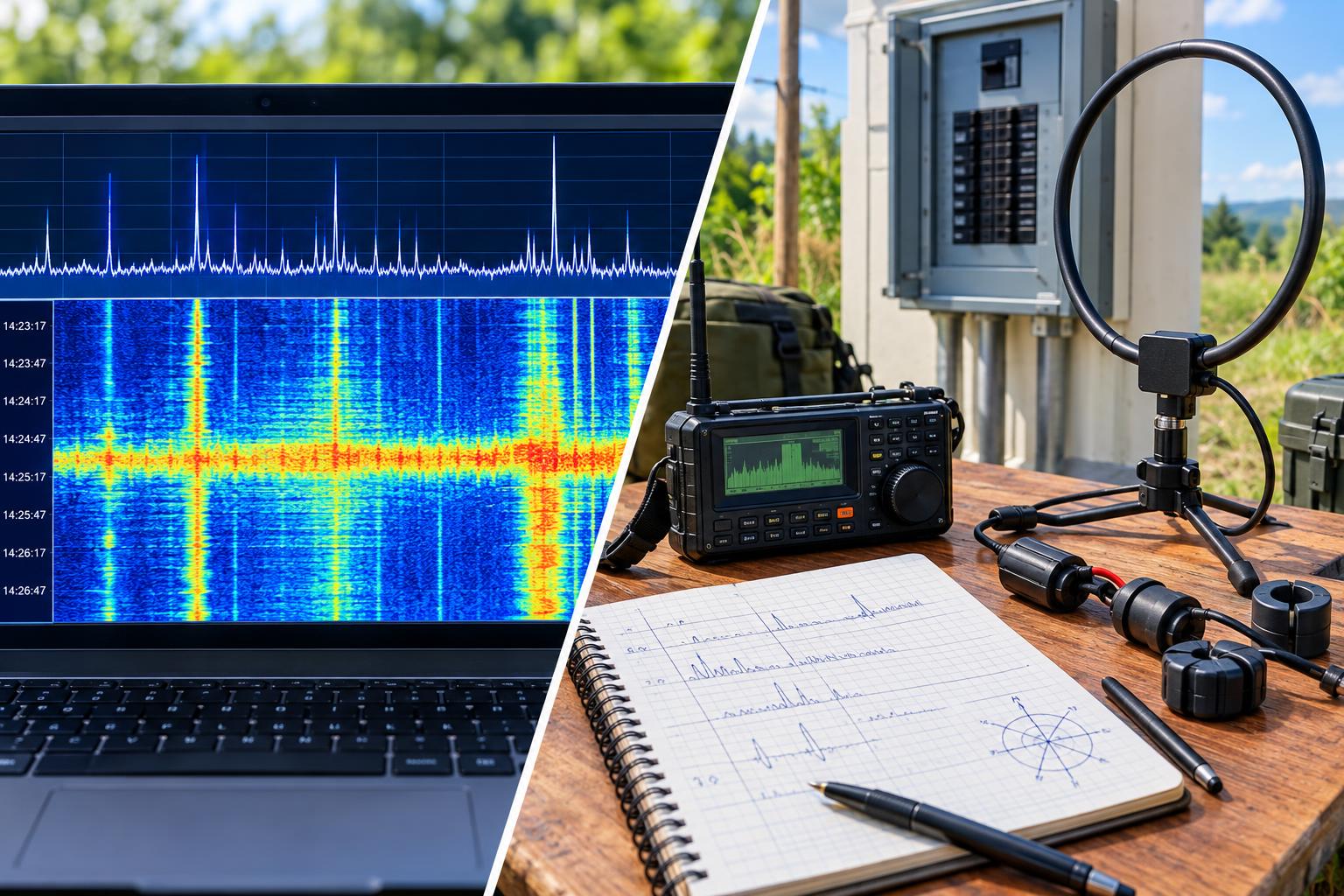
- Save screenshots. Capture the waterfall with frequency scale, signal level scale if available, date, and time.
- Record audio and I/Q if possible. A short AM-mode audio clip often reveals buzz, rasp, ticking, or arcing patterns more clearly than a still image.
- Note the noise floor. If your software displays dBm or S-units, log the value, but remember that uncalibrated S-meters and SDR displays are comparative tools unless properly calibrated.
Waterfall clues are helpful but not conclusive. A wide raised floor may be common-mode noise arriving on your feed line. Narrow carriers may be electronics, networking gear, birdies, or legitimate signals. Repeating bands of hash every few kHz can suggest switching power supplies. Intermittent broadband bursts may point toward arcing, thermostats, motor controllers, chargers, or utility hardware.
Run the Home Isolation Breaker Test Correctly
The breaker test answers one critical question: is the source powered from your premises? Do this safely and methodically.
Preparation
- Put the receiver, SDR, laptop, and any required network-free logging method on battery power.
- If your station uses an active antenna, bias tee, antenna switch, preamp, rotator controller, USB hub, or external monitor, make sure each item is either intentionally battery-powered or disconnected for the test.
- Tell other household members before shutting power off. Avoid interrupting medical equipment, security systems, sump pumps, or critical appliances.
- Do not remove electrical panel covers or touch service conductors. Operate only normal breakers that you are competent and permitted to operate.
Procedure
- Start the SDR waterfall and audio recording on the problem frequency.
- Turn off branch breakers one at a time and pause long enough to see whether the waterfall changes.
- If one breaker causes a major drop, leave it off briefly and identify the loads on that circuit.
- If no branch breaker changes the noise, turn off the main breaker if it is safe and practical. Keep the receiver on battery.
- Log every step with times: breaker off, breaker on, noise changed, no change.
If the noise disappears when a branch circuit is off, the source is likely on that circuit. If the noise remains with the main breaker off and your receive setup is truly isolated from house power, the source is probably external to your home or is being received directly by the antenna from an outside device. If the noise drops only when disconnecting USB cables, Ethernet cables, wall-wart chargers, monitors, or station accessories, you may be dealing with conducted noise entering through station wiring rather than radiated noise from a distant source.
Find In-House Sources Before Blaming the Antenna
Common household offenders include switching power supplies, LED lamps, dimmers, battery chargers, plasma or older electronic displays, variable-speed HVAC equipment, aquarium heaters, touch lamps, Ethernet-over-power adapters, garage door openers, and solar power electronics. In the shack, look at USB chargers, powered speakers, wall warts, computer monitors, cheap HDMI adapters, and noisy laptop supplies.
Once a suspect circuit is found, unplug devices rather than merely turning them off. Many appliances continue running standby supplies when apparently off. Watch the waterfall as each item is unplugged. The best evidence is an immediate, repeatable change: plug in, noise appears; unplug, noise disappears.
Use Ferrites Where They Actually Help
Ferrite chokes are useful when unwanted RF current is riding on the outside of coax shields, control cables, speaker leads, USB cables, DC power leads, or Ethernet cables. They do not repair a defective power pole, and they usually do not make a noisy device compliant by magic. They reduce a coupling path.
- On receive feed lines: place common-mode chokes near the antenna feed point and near the receiver entrance when common-mode pickup is suspected.
- On power and data leads: choke both conductors of a pair together so the ferrite sees common-mode current, not normal operating current.
- Use multiple turns when practical: winding several turns through a suitable ferrite core often increases choking impedance at HF.
- Confirm with A/B testing: install the choke, capture the waterfall, remove or bypass it if practical, and compare.
If ferrites reduce the noise only when placed on the receiver’s cables, your station wiring may be acting as an unintended antenna. If ferrites on the offending device’s leads reduce emissions, that may solve a household problem. For a neighbor’s device, diplomacy matters: provide clear observations, avoid accusations, and offer a simple test only if invited.
Build an RFI Log That Others Can Use
The American Radio Relay League’s RFI guidance emphasizes documentation, isolation tests, recordings, direction finding, and the use of tools such as SDRs, spectrum scopes, and audio analysis. Your log does not need to be fancy, but it should be consistent.
Minimum useful RFI log fields
- Date and local time
- Frequency, mode, bandwidth, and antenna
- Receiver or SDR settings that affect level
- Noise description: steady, pulsed, drifting, intermittent, weather-related, time-of-day pattern
- Waterfall screenshot filename
- Audio or I/Q recording filename
- Breaker-test result
- Direction-finding notes and map references
- Weather conditions if power-line noise is suspected, especially wind, rain, dry conditions, or humidity changes
Audio editors such as Audacity can help visualize periodic buzzing or pulses, but avoid overclaiming. A 120 Hz buzz pattern may be consistent with arcing related to AC power, but it is not by itself proof of a specific pole or device. Treat every clue as part of a larger case.
Direction Finding: From Your Shack to the Street
Direction finding starts with a simple question: does the signal have a direction, or is it entering through wiring everywhere? For HF, a small portable loop, a battery-powered receiver, or a handheld SDR with a loop or whip can be more useful than a full-size base antenna.
Practical DF sequence
- Confirm the signal on more than one frequency. Power-line-type noise is often broadband and may be audible across multiple HF bands.
- Use AM mode. AM reception often makes impulse noise easier to hear and compare.
- Reduce receiver gain. As you get closer, add attenuation or use a smaller antenna to avoid overload and false peaks.
- Use nulls carefully. A loop antenna’s null can be sharper than its peak, but reflections and wiring can distort bearings.
- Move in stages. Check your yard, then sidewalk or public areas, then compare bearings from multiple locations.
Do not enter private property, climb poles, open utility cabinets, touch guy wires, or get near energized equipment. Direction finding for utility noise is about locating likely evidence, not performing electrical work.
Recognizing Power-Line-Like Noise
Power-line interference is often broadband, harsh, raspy, and strongest on lower HF bands, though it can appear higher. It may vary with wind, moisture, temperature, and load. Dry, windy weather can aggravate loose or contaminated hardware; rain may temporarily quiet some sources or make others worse. Arcing sources can produce repetitive buzz, snapping, or frying sounds in AM audio.
IEEE Std 1897-2024 provides a recent standards reference for practices related to locating power-line interference, and ARRL maintains specific guidance on power-line noise. For the amateur operator, the practical takeaway is simple: utilities respond best to specific, repeatable observations, not vague reports that the bands are noisy.
When to Call the Utility
Contact the utility when you have reasonable evidence that the source is outside your home and associated with power distribution equipment. Useful evidence includes:
- The noise remains with your main breaker off while the station is battery-powered.
- The signal is heard on a portable receiver away from your house.
- Bearings or walking tests repeatedly point toward the same pole, transformer area, or line section.
- The noise changes with weather or wind in a way consistent with arcing hardware.
- You have screenshots, recordings, dates, times, and frequencies.
When reporting, be concise and cooperative. Say that you are a licensed amateur radio operator experiencing radio-frequency interference, you have performed a home power isolation test, and you have observations suggesting a possible power-line noise source near a particular location. Do not demand that a line crew accept your diagnosis. Ask for an investigation by personnel who handle radio or power-quality interference complaints.
Regulatory and Neighbor Caveats
In the United States, the FCC has jurisdiction over radio-frequency interference issues, and many consumer electronic devices operate under rules that require them not to cause harmful interference. The FCC’s interference guidance is a useful background reference, but most problems are solved faster with good documentation and courteous cooperation than with threats.
For neighbor-related RFI, start with your own proof. Demonstrate that the noise is not from your house before approaching anyone else. If a specific device is suspected, ask for a short, convenient test rather than making accusations. Offer to share recordings or screenshots. If a manufacturer, landlord, solar installer, or utility becomes involved, your RFI log becomes the common technical language.
Example Workflow
Suppose 40 meters changes from a normal evening noise floor to a broad S7 hash with diagonal streaks on the waterfall. You capture screenshots at 7.180 MHz in AM and SSB, record 60 seconds of audio, and log the antenna and receiver settings. On battery power, you turn off branch breakers. The noise remains. You turn off the main breaker; the noise still remains. A portable receiver hears the same buzz on the sidewalk, and a small loop gives a consistent null pointing along the street. Two evenings later, the noise is worse in dry wind and quieter after rain. You now have a reasonable basis to continue DF from public areas and, if the evidence points to distribution equipment, contact the utility with a clear report.
By contrast, if the noise vanishes when the office breaker is off and returns when an LED desk lamp is plugged back in, the solution is local: remove the device, replace its supply, add appropriate chokes if effective, or relocate it away from station wiring.
Key Takeaways
- Use the SDR waterfall as an evidence tool, not just a display.
- Run the breaker test with the receiving setup on battery power.
- Document screenshots, audio, settings, times, and weather.
- Apply ferrites to reduce common-mode coupling, not as a cure-all.
- Use safe, legal direction finding from your property and public areas.
- Call the utility when the evidence points outside your home and toward power distribution equipment.
FAQ
Can an SDR waterfall prove the source of RFI?
Usually not by itself. A waterfall can show timing, bandwidth, drift, and relative strength, but source identification requires isolation tests, repeatability, and often direction finding.
Should I transmit while troubleshooting receive noise?
Normally no. Receive-noise troubleshooting is best done by listening, recording, and isolating. Transmitting adds variables and may create separate RF-in-the-shack issues.
Why does the noise change when I touch the coax or laptop?
That often suggests common-mode pickup or conducted noise through station wiring. Check bonding, cable routing, USB and power leads, and feed-line choking.
What if the utility says it cannot find anything?
Provide your log, recordings, dates, and location notes. Continue documenting patterns. If needed, consult ARRL RFI resources for guidance on organizing a more complete case.