

Why linear satellites feel different from FM birds
If you already know how to work an FM amateur satellite, linear satellite ham radio is the next rewarding step. Instead of one FM channel where everyone takes turns, a linear transponder passes a slice of spectrum from its uplink to its downlink. Several SSB and CW signals can fit inside that passband at the same time, provided operators use reasonable power and stay aware of Doppler shift.
The big difference is this: on a linear satellite, you must hear your own downlink. Full-duplex monitoring is not a luxury; it is the feedback loop that tells you whether your uplink is inside the passband, whether your audio is intelligible, and whether Doppler has pulled you off frequency. Without it, you are guessing.
For current satellite choices and health reports, start with AMSAT’s live linear satellites page and AMSAT status. Those pages are especially useful because active satellites, operating modes, and user reports change over time.
The station you need: full duplex first, power second
A practical SSB/CW satellite station can be modest, but it needs the right capabilities. The essential pieces are:
- An all-mode VHF/UHF transmit path capable of SSB and/or CW on the required uplink band.
- An independent receive path for the downlink, preferably with headphones so you can hear your own signal while transmitting.
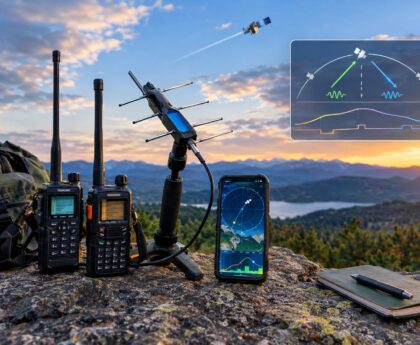
- A directional antenna such as a handheld dual-band Yagi, log-periodic, or small crossed Yagi system.
- Accurate pass prediction from satellite-tracking software or a reliable web/mobile tool using current orbital elements.
- A way to tune smoothly, manually or with computer-assisted Doppler control.
Some operators use one full-duplex all-mode satellite transceiver. Others use two radios: one transmitting and one receiving. Either can work. What matters is that the transmit signal does not overload the receiver. If you use two radios, pay attention to receiver desense, physical antenna separation, filtering, and the possibility that a strong uplink signal may make the downlink seem to vanish.
Do not begin by adding more power. Begin by improving your receive system. Aiming, polarization, low-loss feed line, and careful tuning usually matter more than brute-force RF output.
Understand the passband before you call CQ
A linear transponder has an uplink passband and a downlink passband. Your signal enters somewhere in the uplink slice and appears somewhere in the downlink slice. Many amateur linear satellites use inverting transponders: a signal placed higher in the uplink passband appears lower in the downlink passband, and the sideband is inverted. In practice, operators commonly listen on USB downlink and use the uplink mode specified for that satellite and transponder.
Always check the current satellite information rather than relying on memory. The exact uplink, downlink, mode, and operational notes should come from a current source such as AMSAT. The AMSAT station and operating hints page is also a useful reference for practical setup concepts.
Doppler: the skill that keeps your signal readable
Doppler shift is the apparent frequency change caused by the satellite moving rapidly toward or away from your station. When the satellite approaches, the received downlink appears higher than its nominal frequency. As it recedes, the downlink appears lower. The effect is larger on 70 cm than on 2 meters, so a UHF downlink or uplink usually needs more attention.
There are two common ways to handle Doppler:
- Computer-assisted control: Tracking software adjusts one or both VFOs during the pass. You still monitor your own downlink and make small corrections as needed.
- Manual control: You tune by ear while watching the pass progress. This works well with practice, especially on SSB and CW.
The operating goal is simple: keep your downlink audio at a steady pitch. If your voice or CW tone slides upward or downward in your headphones, correct it. During a QSO, many operators prefer to leave the receive frequency stable relative to the station they are copying and adjust the uplink so their own downlink stays in place. This reduces the chance of chasing each other across the transponder.
A manual tuning example
Assume you have chosen a clear spot in the passband and can hear the satellite downlink. Before transmitting, tune the receiver until the noise floor and any nearby signals sound normal. Then transmit a brief, low-power test such as your call sign only. If you do not hear yourself, stop transmitting and adjust; do not keep calling blindly.
Once you hear your own downlink, fine-tune the uplink until your voice sounds natural or your CW sidetone matches the pitch you expect. As the pass continues, make small uplink corrections. Near the middle of the pass, changes may feel slower; near acquisition and loss of signal, they may feel faster and more unstable.
Choosing passes that help rather than punish you
Not every pass is a good training pass. Very low passes may be weak and obstructed by terrain, trees, or buildings. Extremely high overhead passes can have rapid azimuth changes that make handheld aiming and Doppler tracking harder. For early attempts, a moderate-elevation pass with a clear horizon and a quiet operating location is often easier.
Before the pass, note three things:
- AOS, maximum elevation, and LOS: Know when the satellite rises, peaks, and sets from your location.
- Direction of travel: Plan where your antenna will point at the start, middle, and end.
- Likely footprint: Know which regions can hear the satellite at the same time so you can anticipate possible contacts.
For handheld antennas, practice the antenna motion before the pass begins. Keep the feed line managed, use headphones, and avoid juggling too many devices. A printed pass sheet or simple notepad can be more reliable than tapping through screens while the satellite is moving.
Power etiquette on a shared transponder
A linear transponder is a shared resource. Excessive uplink power can trigger satellite AGC behavior, raise the apparent noise floor, or reduce the quality of other users’ downlinks. The correct power is the minimum needed for a readable signal through the satellite.
A good rule is to compare your downlink to other signals and, where applicable, to the satellite beacon or expected passband level. Your signal should not dominate the transponder. If you are much louder than everyone else, reduce power, improve your aiming, or both.
- Do not transmit FM into an SSB/CW linear transponder unless the satellite’s published mode specifically supports it, which typical linear SSB/CW operation does not.
- Use short calls. “CQ satellite, W1ABC grid FN42” is enough.
- Avoid tuning up on top of active QSOs. Find a clear spot and listen first.
- Stop transmitting if you lose your downlink. Reacquire before calling again.
Making the QSO: what to say and what to log
Satellite SSB/CW contacts are usually brief because the pass is short and others may be waiting. A typical exchange includes call signs and Maidenhead grid squares. Signal reports may be exchanged, but grid information is often the key item for awards and personal tracking.
Example SSB exchange:
- You: “CQ satellite, K8XYZ, Echo November Nine One.”
- Other station: “K8XYZ from N5ABC, Echo Mike One Two.”
- You: “N5ABC, roger EM12, you are 59 in EN91.”
- Other station: “Roger EN91, thanks, 73.”
For CW, keep it even shorter: calls, report if desired, grid, confirmation, and 73. Use a speed that matches your ability to copy under Doppler and fading. A clean 12 to 18 wpm satellite CW contact is more useful than a fast exchange that neither station fully copies.
Your log should include UTC date and time, both call signs, both grid squares, satellite name, mode, band information, and propagation mode such as satellite if your logging software supports it. If you upload to confirmation systems or pursue awards, follow their current formatting rules for satellite names and grid entries.
Troubleshooting: when the downlink disappears
If you lose your downlink, avoid the instinct to increase power immediately. Work through the likely causes:
- Antenna aim: Recheck azimuth and elevation. A few degrees can matter with a small Yagi.
- Polarization mismatch: Rotate the handheld antenna slightly. Satellite signals can fade as polarization changes.
- Doppler error: Sweep gently around the expected downlink while sending only very brief test transmissions.
- Receiver overload or desense: Reduce transmit power, increase antenna separation, or improve filtering.
- Wrong sideband or inversion assumption: Verify the satellite’s published mode and transponder notes.
- Pass geometry: Buildings, terrain, or trees may be blocking the path.
If you cannot hear yourself after a few short attempts, stop and listen. You will learn a great deal by copying experienced operators’ signal levels, tuning behavior, and QSO rhythm.
Safety and regulatory notes
Operate only within your license privileges and the rules that apply in your jurisdiction. In the United States, that means observing FCC amateur rules, band allocations, permitted emissions, station identification, and RF exposure requirements. Portable satellite work can also involve trip hazards, vehicle surroundings, weather, batteries, and overhead power lines. Keep handheld antennas away from power lines, secure cables, and avoid operating where your attention to the pass could create a safety problem.
Key takeaways
- Linear satellites reward careful listening more than high power.
- Full-duplex monitoring is the central skill: hear your own downlink or stop transmitting.
- Doppler is normal; correct it smoothly and keep your downlink audio stable.
- Choose moderate, unobstructed passes while learning.
- Use concise exchanges and log grid squares, satellite, mode, and UTC details accurately.
FAQ
Can I work linear satellites with an FM handheld?
Not for normal SSB/CW linear-transponder operation. You need equipment capable of the required all-mode uplink and downlink operation, plus full-duplex monitoring.
Is computer Doppler control required?
No. It is helpful, but many operators use manual tuning successfully. The requirement is not automation; it is the ability to hear and correct your own downlink.
How much power should I use?
Use the minimum power that produces a readable downlink. If your signal is much stronger than others, reduce power. Better antenna aiming often helps more than additional watts.
Where should I find current satellite frequencies?
Use current references such as AMSAT’s live linear satellite listings, AMSAT status reports, and the practical guidance at AMSAT-UK’s SSB satellite guide. Verify details before each operating session because satellites and operating status can change.